
Introduction
Which Microsoft 365 license are you assigning to most of your users? Many businesses make the wrong choice, resulting in overspending or leaving paid features unused. The most common mistakes include:
- Opting for Business Standard with third-party antivirus and antispam instead of Business Premium.
- Choosing E3 over Business Premium when you have fewer than 300 users.
- Selecting E5 instead of E3 without configuring the additional features.
Continue reading to discover the right license for your needs, helping you save money and fully utilise the technology you’re paying for.
A Few Notes
Article Scope: This article focuses on Business Standard, Business Premium, E3, and E5. I won’t be covering smaller licenses like Business Basic and Exchange Online, as these low-cost, low-feature options have limited potential to maximise value.
Teams: Business Premium, E3, and E5 are available with or without Teams—it’s your choice. Everything discussed here assumes Teams is included. While this decision doesn’t impact the features covered, it does affect the overall cost.
Office 365 and Microsoft 365: There are two types of E3 and E5 licenses: Office 365 E3/E5, which generally does not include security features, and Microsoft 365 E3/E5, which generally does. This article focuses exclusively on Microsoft 365 E3/E5.
Useful Resource: If you need additional information beyond what I cover in this article, I recommend visiting M365 Maps: https://m365maps.com/. It’s an excellent resource for easily reviewing and comparing all Microsoft 365 licenses. Also, remember that Microsoft often changes what’s included in each license. M365 Maps shows a history of these changes.
Mistake 1 – Business Standard vs Business Premium
Many businesses still rely on Business Standard and third-party antivirus or antispam solutions, including free versions, which isn’t ideal. With Business Premium, you get market-leading antivirus and antispam protection built-in, allowing you to cancel your third-party subscriptions, save money, enhance your security, and manage everything from a single platform.
Upgrading to Business Premium also provides a wide range of additional security features that Business Standard does not offer. These features give small and medium-sized businesses (SMBs) enterprise-level security and help them transition to a ‘zero trust’ security model.
Business Premium includes Defender for Endpoint, a next-generation XDR (Extended Detection and Response) solution that has been independently rated as a market leader. Switching to Business Premium not only saves money but also significantly boosts your endpoint security.
The package also includes Defender for Office 365, which protects against spam and phishing attacks and scans all links and attachments in emails, Teams, and SharePoint for malicious content. This makes it a much more comprehensive solution than most third-party options.
To highlight the potential cost savings, the following comparison table illustrates the cost difference between Business Standard with third-party security and Business Premium.
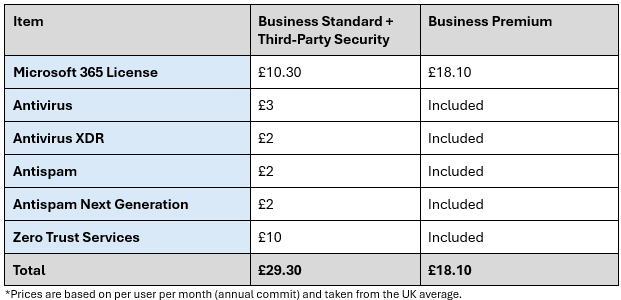
I think this table speaks for itself!
So, what additional Zero Trust services are included with Business Premium? While this article won’t cover all the details, I want to highlight some key benefits.
First, let’s briefly explain Zero Trust. Zero Trust is a security approach increasingly adopted by organisations focused on enhancing their security. Its core principle is “never trust, always verify,” which involves continuously verifying users, devices, networks, locations, and other indicators before granting access. Business Premium includes technologies that enable this level of security. Some of the most popular features are:
- Conditional Access: Controls who can access your system. Without conditional access, anyone with a username, password, and an internet connection could access your data. Conditional access allows you to specify criteria like location, device, and additional requirements needed for connection.
- Intune: Helps manage your devices by ensuring they meet specific security and compliance requirements before connecting to your platform.
- Azure Information Protection: Encrypts documents and emails, ensuring that only specified recipients can open or edit them, no matter where they are stored.
- BYOD (Bring Your Own Device) Protection: This feature supports the secure use of personal devices (laptops and smartphones) for work. App Protection prevents users from copying company data from corporate apps on their smartphones and enables remote wiping of company data if an employee leaves. Combined with Intune and Conditional Access, you can control how company data is accessed on personal devices, including blocking actions like file downloads.
As you can see, Business Premium offers potential cost savings and provides a wide range of features that can significantly enhance your security posture.
Mistake 2 – Business Premium vs E3
As highlighted above, upgrading from Business Standard is an obvious choice for most business leaders. However, many mistakenly choose the E3 plan instead of Business Premium.
Why does this happen?
The common response is, “We need the Enterprise version of Microsoft 365.” Given the significant cost difference between the two licenses, this statement deserves closer examination. Business Premium is priced at £18.10 per month, while E3 costs £31.00 per month. For a business with 75 users, that’s an additional £967 per month!
Generally, there are very few scenarios where E3 is a better choice than Business Premium. However, I want to highlight two key reasons why E3 might be the preferred option:
- User Limit: All Business plans are limited to 300 licenses. If your organisation has more than 300 users, E3 or E5 will be required.
- Specialised Features: E3 includes some specialised features unavailable in Business Premium. While most of these features are rarely used, it’s important to recognise that selecting the right license should be done with the guidance of a specialist who understands your business goals and technology needs to make the best recommendation. For a full side-by-side comparison of E3 and Business Premium, visit https://m365maps.com/matrix.htm#000001000001000000000
Outside of these situations, choosing Business Premium will save money and provide more relevant and useful features.
I have summarised the most important features that my customers look for and compared the plans below:E3 provides more storage space for files and emails, but you can always upgrade individual users if they require extra space.
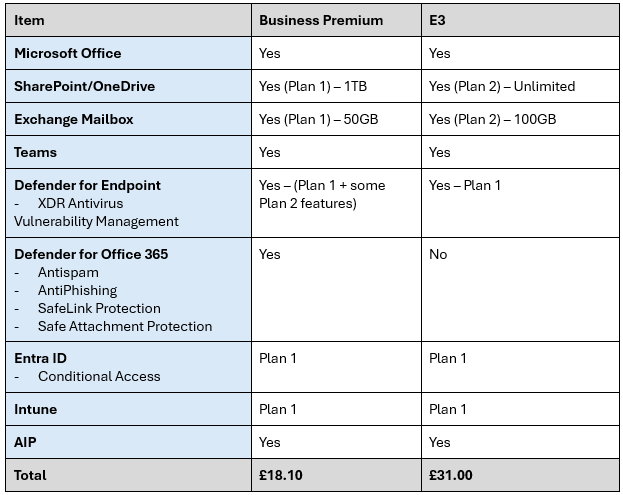
Notice that Microsoft includes Defender for Office 365 and improved Defender for Endpoint with Business Premium. This is huge value for money and means you do need 3rd party antivirus or antispam solutions.
My advice?
If you have fewer than 300 users, Business Premium offers better value for money. Unless there are specific features in E3 that you truly need, there’s no good reason to choose it over Business Premium, except if you exceed the 300-user limit.
If your IT provider recommends E3, ask them to justify which specific features require E3 and why Business Premium wouldn’t meet your needs. Additionally, confirm whether these features are actually configured and in use. Simply having the licenses doesn’t activate the features; they must be configured appropriately, which typically involves an additional cost from your IT provider.
Mistake 3 – E5
What about E5?
If you have more than 300 users and are deciding between E3 and E5, it’s important to understand the key differences. To keep it simple, E5 primarily offers enhanced security features over E3, including:
- Defender for Endpoint Plan 2
- Defender for Office 365 Plan 2
- Defender for Cloud Apps
- EMS E5
- Entra ID Plan 2
These tools collectively provide a significant boost to your security posture and are the same solutions Microsoft uses internally for its 228,000 employees. For a full comparison, you can check the details here: https://m365maps.com/matrix.htm#000000000001001000000
However, a common mistake is purchasing E5 simply because it’s perceived as “the best” without fully understanding what you’re getting for nearly double the cost of E3 (£50.30 per month vs. £31.00 per month). If you’re unaware of the specific features you’re paying for, or if they aren’t properly configured, then you won’t be getting the full value from your investment.
Before committing to E5, consult with a specialist who can clearly explain the benefits and ensure that the added features are properly set up. If your IT provider has recommended E5, make sure they justify the need for these advanced features and verify that they have been correctly configured. Simply having the licenses is not enough; they must be fully activated and utilised to be effective.
Summary
I’ve provided a lot of information here, and I hope it’s helpful. To summarise my advice:
- Avoid using Business Standard with third-party security tools; opt for at least Business Premium.
- Unless you have over 300 users, E3 or E5 is rarely the best choice—Business Premium is almost always the more cost-effective option.
- Choose E5 only if you have specific security needs and can clearly justify the additional expense.
If you need further help or want to discuss any of this in more detail, feel free to reach out to us.

Related Posts








GET IN TOUCH.
We’d love to hear from you! Whether you have a question, need support, or want to learn more about how our services can help you maximize the potential of Microsoft 365, we’re here to help. Fill out the form with your full name and email address, and our dedicated team will get back to you promptly. At Atomyc, we are committed to providing personalized solutions and exceptional customer service to help your business thrive.